

Getting Started and Migration Guide: Transitioning from ADA 3.x to ADA 4.0 / MDA
Who This Guide Is For
This guide is for firmware developers with an existing ADA 3.x product who need to understand what changed in ADA 4.0 / MDA and how to migrate their application. If you're setting up a new devkit and building a sample application for the first time rather than migrating existing firmware, see the Integrated Agent v4.0 guide instead. This document covers concepts and migration, not build/flash instructions.
Guide Overview
This guide is organized as follows:
- Introduction - what ADA 4.0 and MDA are, how they relate to each other and to ADA 3.x, and why the SDK moved to MQTT based architecture.
- Architecture and Layer Relationships - the shared layered design behind both variants.
- Key Operational and Configuration Changes - the three biggest behavioral shifts from ADA 3.x: network management, configuration management, and the CLI.
- Demo Showcase - which of the three sample applications fits your situation.
- Step-by-Step Migration Guide - two concrete migration paths, plus a full API mapping reference.
- Summary and Troubleshooting - a checklist for the most common early issues.
1. Introduction: ADA 4.0 / MDA vs. ADA 3.x
This guide introduces the next-generation agent SDK and provides step-by-step instructions on how to migrate your existing firmware applications from the legacy Ayla Device Agent (ADA) SDK (ADA 3.x, based on a hybrid MQTT protocol) to the new ADA 4.0 or MDA agent.
1.1 Naming
The agent SDK comes in two variants:
| Name | Components | Description |
|---|---|---|
| ADA 4.0 | mda_ada compatibility layer + MDA agent | The full-featured agent built on top of the MDA core, providing a fully compatible ADA API surface for ADA 3.x firmware applications. Some application-level changes are still required (see Section 5). |
| MDA | MDA agent only | The MQTT based agent without the ADA compatibility layer. Best for new product development or full refactoring where ADA 3.x APIs are not needed. |
Both variants share the same MDA core - a MQTT-based protocol engine.
1.2 What Is the MDA Core?
The MQTT Device Agent (MDA) core is the next-generation protocol engine for connecting embedded devices to the Ayla Cloud. It uses a MQTT-based protocol for communication, replacing the ADA 3.x SDK, which relied on a hybrid MQTT protocol (HTTP REST + MQTT).
1.3 Why MQTT Based Integration?
The shift from REST APIs to MQTT based integration provides significant improvements in device connectivity and resource utilization:
| Feature | ADA 3.x | ADA 4.0 / MDA (MQTT Based) | Benefit of ADA 4.0 / MDA |
|---|---|---|---|
| Protocol | HTTP/HTTPS (REST API) + MQTT (Hybrid) | MQTT Based (over TLS) | Standardized, lightweight message exchange. |
| Connection Model | Request-Response, HTTP long polling | Persistent TCP/MQTT session | Real-time bi-directional pushing with minimal latency. |
| Bandwidth Overhead | High (verbose HTTP headers and JSON bodies) | Low (compact packet structure) | Lower data costs, optimized for cellular and battery devices. |
| Power Consumption | High (frequent TCP handshakes for polling) | Low (heartbeat keepalives maintain state) | Longer battery life for low-power edge nodes. |
| Property Management | Static, large property tables compiled in flash | Dynamic, event-driven callback query interface | Reduced RAM/flash footprint and flexible runtime configuration. |
| ADA API Compatibility | Native | ADA 4.0: full compatibility via mda_ada compatibility layer (minor app changes required) · MDA: not available | Graceful migration path for existing products. |
1.4 Prerequisites
- Hardware: The SDK currently targets Espressif ESP32 series SoCs.
- ESP-IDF Version: The ADA 4.0 / MDA SDK has been validated against ESP-IDF v5.5.5.
- If you are building with ESP-IDF v5.5.5 (or highly compatible v5.x patch versions), the SDK's Platform Abstraction layer (
mda_pfm) will compile and work out of the box. - If your ADA 3.x project is running on an older or significantly different ESP-IDF version (for example, ESP-IDF v4.x), you will either need to upgrade your project to v5.5.5, or manually backport the SDK's abstraction layer (
components/mda_pfm/esp32) to align with the older IDF APIs.
- If you are building with ESP-IDF v5.5.5 (or highly compatible v5.x patch versions), the SDK's Platform Abstraction layer (
Note on upcoming features: Features such as File Properties and LAN Mode, which were available in ADA 3.x, are not implemented in the initial release of ADA 4.0 / MDA. These features will be supported in future updates.
2. Architecture & Layer Relationships
Both ADA 4.0 and MDA share a common layered architecture designed to isolate application logic, protocol management, compatibility utilities, and target hardware platforms.
- ADA 4.0 - includes the
mda_adacompatibility layer on top of the MDA core, providing ADA 3.x API compatibility. - MDA - uses only the MDA core directly, without the
mda_adacompatibility layer.
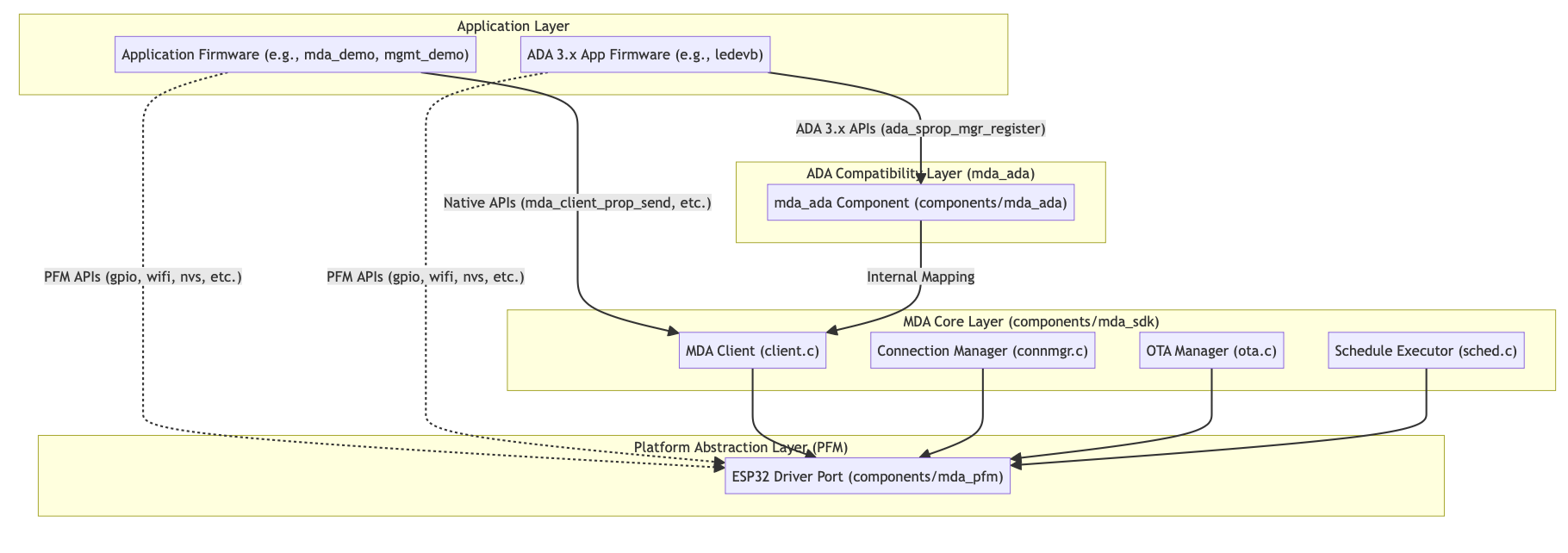
Layer Details
Application Layer
Contains target firmware business logic. Applications can:
- Interface natively with the MDA core (producing an MDA agent), or via the
mda_adacompatibility layer (producing an ADA 4.0 agent). - Access platform services directly through the PFM layer (for example, GPIO control, Wi-Fi, NVS storage).
ADA Compatibility Layer (mda_ada) — in components/mda_ada
Provides a fully compatible ADA API surface — emulates ADA 3.x structure definitions (struct ada_sprop) and registration functions. This enables ADA 3.x projects to compile and run on ADA 4.0 with only minor application-level changes.
MDA Core Layer — in components/mda_sdk
Manages MQTT connection state, OTA dispatching, scheduled tasks, and device properties. It is platform-independent and shared by both ADA 4.0 and MDA agents.
Platform Abstraction Layer (PFM) — in components/mda_pfm
Abstract interfaces (pfm/*.h) wrapping the operating system, hardware (GPIO, LED), persistent storage (NVS), and network socket drivers. This layer implements target-specific logic for the ESP32 platform.
3. Key Operational and Configuration Changes
Before diving into the demos, it's essential to understand three major architectural shifts between ADA 3.x and ADA 4.0 / MDA.
3.1 Network Management: Connection Manager (CONFIG_MDA_CONNMGR_SUPPORT)
CONFIG_MDA_CONNMGR_SUPPORT)In ADA 3.x, the agent SDK included separate modules like adw (Wi-Fi) which the application had to manually tie to the proxy agent. ADA 4.0 / MDA restructures this via a native Connection Manager and Kconfig.
ADA 3.x pattern (manual glue):
/* ADA 3.x required the app to explicitly register Wi-Fi events and glue them to the agent */
static void demo_wifi_event_handler(enum adw_wifi_event_id id, void *arg) {
    if (id == ADW_EVID_STA_UP) {
        ada_client_up();   // Start cloud proxy connection
    } else if (id == ADW_EVID_STA_DOWN) {
        ada_client_down(); // Stop cloud proxy
    }
}
void app_main(void) {
    adw_wifi_init();
    adw_wifi_event_register(demo_wifi_event_handler, NULL);
    // ...
}
ADA 4.0 Managed Mode (CONFIG_MDA_CONNMGR_SUPPORT=y, default) — demonstrated in examples/mda_demo, examples/ledevb
The SDK automatically handles network driver initialization, detects IP assignment, and triggers ada_client_up() / ada_client_down() internally.
/* Zero network glue code required in the application (if AUTO_START is enabled) */
void app_main(void) {
    ada_init(); // Connection Manager handles PFM drivers and network connection automatically
    // ...
}
NOTEIn ADA 4.0,
ada_client_up()is a macro mapping directly tomda_client_up(). However,ada_init()is a real wrapper function that callsmda_client_init()while also handling ADA 3.x configuration loading and auto-starting the network. You can use either theada_*ormda_*naming convention interchangeably where appropriate.
ADA 4.0 Decoupled Mode (CONFIG_MDA_CONNMGR_SUPPORT=n) — demonstrated in examples/mgmt_demo
The host application maintains full control over the network interface. The SDK remains passive until the application explicitly invokes it.
/* Example (based on mgmt_demo): Application directly uses PFM or OS networking */
static void wifi_evt_cb(enum pfm_wifi_event event, enum pfm_wifi_err err, void *ctx) {
    if (event == PFM_WIFI_EVENT_STAT_IP_GOT) {
        mda_client_up();   // Explicitly trigger agent cloud connection
    } else if (event == PFM_WIFI_EVENT_STA_LOST) {
        mda_client_down(); // Stop agent connection immediately
    }
}
void app_thread_init(void *ctx, struct mda_thread *thread) {
    /* 1. Initialize Native Protocol Engine */
    mda_client_init();
    /* 2. Developer controls exactly when and how the network starts */
    pfm_wifi_init();
    pfm_wifi_on();
    pfm_wifi_connect(&ssid, &key, PFM_WIFI_SEC_WPA2, wifi_evt_cb, NULL);
}
3.2 Configuration Management (conf)
conf)In ADA 3.x, parameters like OEM information were often statically defined as global variables in the application (for example, char oem[] = ...). In ADA 4.0 / MDA, these configurations are managed consistently via Kconfig defaults and persistent storage (NVS).
- Code level (Kconfig): Configured through Kconfig defaults (for example,
CONFIG_MDA_OEM_MODEL_DEFAULT,CONFIG_MDA_OEM_ID_DEFAULT). The agent reads these from persistent storage during initialization. - Code level (runtime): Template Version is passed explicitly via the
mda_client_template_version_set()API in your application code. - CLI level (console): While ADA 3.x provided root-level
conf,oem,save, andresetcommands, ADA 4.0 / MDA significantly enhances their syntax and flexibility:oem— now supports setting both the OEM ID and model directly (oem <OEM-ID>oroem model <OEM-model>).conf— upgraded to support setting arbitrary configuration paths dynamically (conf set <path> <value>), instead of being limited to display purposes.save/reset— functionality is identical but deeply integrated with the new NVS persistent flash architecture.
3.3 Command Line Interface (CLI)
In ADA 3.x (for example, ledevb), the application was responsible for manually registering CLI commands by writing boilerplate code such as climgr_register_conf(), climgr_register_log(), or adw_wifi_cli_register().
ADA 4.0 / MDA shifts this responsibility to the SDK. Common diagnostic and configuration commands are now registered automatically by the agent core, and their availability is managed directly through Kconfig.
Currently supported ADA 4.0 / MDA CLI commands: wifi, log, setup_mode, reset, diag, core, oem, conf, save, time, bt, client, prop.
- Agent integration (Kconfig): Enabled by Kconfig flags. General commands use CLI toggles (for example,
CONFIG_MDA_CLI_SETUP_MODE=y), while hardware-specific commands require their respective feature to be enabled (for example, theethcommand only appears ifCONFIG_MDA_ETH_SUPPORT=yis configured). The agent registers these CLI commands automatically uponmda_client_init(). - Application control: If you prefer to manage CLI registration manually in your application layer (the old ADA 3.x way), disable the corresponding
CONFIG_MDA_CLI_*options and register commands manually via the newpfm_cli_cmd_register()API.
CLI command migration comparison:
| ADA 3.x Command | ADA 4.0 / MDA Command | Migration Notes & Functional Changes |
|---|---|---|
wifi | wifi | Reduced. ADA 4.0 removes the scan and commit actions, as well as ap_mode, setup_ios_app, and ssid-mac arguments. It focuses strictly on core STA configuration (ssid, key, security, region, profile) and connection actions (join, enable, disable). |
log | log | Enhanced. MDA supports finer-grained module-level logging (log [--mod <mod>] ...). |
setup_mode | setup_mode | Changed. In ADA 4.0, this acts as a security lock for configuration editing, requiring a password (setup_mode enable <passwd>). |
oem | oem | Enhanced. Now supports setting the OEM ID alongside the model and key directly from the CLI. |
conf | conf | Enhanced. Now supports setting specific config paths dynamically (conf set <path> <value>) in addition to show and save. |
reset | reset | Identical. Reboots the system or performs a factory reset. |
diag, core, crash | diag, core, crash | Identical. System diagnostic, coredump, and crash-testing commands remain unchanged. |
save, time, bt | save, time, bt | Identical. Core utilities for saving config, checking time, and BLE status. |
sched, show, client | sched, show, client | Identical. View schedules, system status, and MQTT connection state. |
| (none) | prop | New. Native testing command for properties. Use prop <name> <value> to test cloud communication directly. |
id | (removed) | Removed. Device ID is now strictly managed internally or via OEM configuration. |
log-client, log-snap | (removed) | Removed. ADA 3.x logging utilities have been consolidated into the unified log command. |
metrics | (removed) | Removed. ADA 3.x metrics command is no longer present in the standard agent core. |
4. Demo Showcase and Getting Started
Three practical examples demonstrate different adoption strategies. Choose the one that best fits your project stage:
              ┌─────────────────────────────────────────┐
              │          Which Demo to Choose?           │
              └────────────────────┬────────────────────┘
                                   │
       Is this a migration of an existing ADA 3.x product?
                            /             \
                          YES              NO
                          /                 \
    ┌────────────────────────┐           ┌────────────────────────┐
    │  1. examples/ledevb    │           │   Need custom network  │
    │  (ADA 4.0 Compat Mode) │           │     or OTA control?    │
    └────────────────────────┘           └───────────┬────────────┘
                                                    /          \
                                                  NO            YES
                                                 /                \
                                ┌──────────────────────┐  ┌──────────────────────┐
                                │ 2. examples/mda_demo │  │ 3. examples/mgmt_demo│
                                │ (Native MDA Core)    │  │ (ADA 4.0, Decoupled) │
                                └──────────────────────┘  └──────────────────────┘
4.1 examples/mda_demo (Recommended for New Projects)
examples/mda_demo (Recommended for New Projects)- Strategy: Pure MDA core natively, without any ADA 3.x wrappers.
- Key concept: Demonstrates dynamic callback-based property handling via
mda_client_prop_cb_set(). - Execution flow:
- Initialize hardware PFM and call
mda_client_init(). - Attach the app task via
mda_thread_attach(). - Register unified
prop_getandprop_setcallbacks. - Connection Manager automatically brings the MQTT client online once an IP is obtained.
- Initialize hardware PFM and call
4.2 examples/ledevb (Recommended for Quick ADA 3.x Migration)
examples/ledevb (Recommended for Quick ADA 3.x Migration)- Strategy: ADA 4.0 with the
mda_adacompatibility layer. - Key concept: Retains existing
ada_sproparrays andada_sprop_mgr_register()calls while running on the new MQTT based engine under the hood. - Key refactoring in this demo:
- Legacy network modules (
adw/adb) are removed. - Direct vendor GPIO calls are replaced with unified
pfm_gpio_*calls (optional, but recommended).
- Legacy network modules (
- API compatibility checklist (
mda_adacompatibility layer):- ✅ Retained & supported:
ada_init(),client_conf_init(),ada_sprop_mgr_register(),ada_sprop_send_by_name(),ada_client_event_register(),ada_sprop_dest_set(), and ADA 3.x type macros (ATLV_BOOL,ATLV_INT, etc.). - ❌ Deprecated / removed:
adw_wifi_init(),adw_wifi_event_register()(replaced by PFM Wi-Fi or the Connection Manager); andadb_*(Bluetooth logic).
- ✅ Retained & supported:
4.3 examples/mgmt_demo (Advanced / Customized Architecture)
examples/mgmt_demo (Advanced / Customized Architecture)- Strategy: ADA 4.0 in Decoupled Mode (
CONFIG_MDA_CONNMGR_SUPPORT=n). - Key concept: The application layer explicitly manages network status and manually calls
mda_client_up()/mda_client_down(). OTA write routines are completely decoupled from internal SDK loops.
5. Step-by-Step Migration Guide (ADA 3.x to ADA 4.0 / MDA)
5.1 Pre-Migration Checklist
Before starting migration, verify whether your product relies on features currently in development:
- File Properties — if your device heavily uses file uploads/downloads via REST, wait for the upcoming ADA 4.0 patch.
- LAN Mode — if local network control without cloud connectivity is required, review your deployment timeline.
5.2 Option A: Migrating to ADA 4.0 (Fast Track Using mda_ada)
mda_ada)Use this option if you want to reuse existing ADA 3.x business logic and property tables with minimal code changes.
Step 1: Update build dependencies
In your component's CMakeLists.txt, replace ADA 3.x includes with mda_ada:
# Old (ADA 3.x)
# idf_component_register(REQUIRES ada ...)

# New (ADA 4.0 / MDA)
idf_component_register(REQUIRES mda_ada mda_pfm mda ...)

# (Optional) Define a macro if you need to maintain a single codebase with #ifdefs
# target_compile_definitions(${COMPONENT_LIB} PRIVATE ADA_4_0_MIGRATION=1)
Step 2: Clean up ADA 3.x network callbacks
Remove all references to adw (Wi-Fi) and adb (Bluetooth) initialization functions. The network state is now handled via PFM or the Connection Manager.
Step 3: Keep your property tables
Your existing property tables remain unchanged:
// Retain your existing struct ada_sprop definitions
static struct ada_sprop demo_props[] = {
    { "Blue_LED", ATLV_BOOL, &blue_led, sizeof(blue_led), ada_sprop_get_bool, demo_led_set },
};

void app_main(void) {
    // This API is fully supported by the `mda_ada` compatibility layer!
    ada_sprop_mgr_register("ledevb", demo_props, ARRAY_LEN(demo_props));
}
5.3 Option B: Migrating to Native MDA (Refactoring for Maximum Efficiency)
Use this option to eliminate ADA 3.x abstraction overhead, reduce binary footprint, and adopt standard event callbacks.
Step 1: Replace property arrays with unified callbacks
Instead of declaring a static array for every property, implement two global getter/setter functions:
/* --- Old ADA 3.x style --- */
// static struct ada_sprop demo_props[] = { ... };
// ada_sprop_mgr_register("my_dev", demo_props, count);

/* --- New native MDA style --- */
static enum mda_err prop_get(const char *name, struct prop_val *val) {
    if (!strcmp(name, "Blue_LED")) {
        prop_val_bool_set(val, blue_led);
        return ME_OK;
    }
    return ME_NOT_FOUND;
}

static void prop_set(const char *name, const struct prop_val *val,
                     const struct prop_dp_meta *meta, u8 meta_count) {
    if (!strcmp(name, "Blue_LED") && val->type == PROP_TYPE_BOOL) {
        blue_led = val->u.u8bool;
        app_update_hardware_led(blue_led);
    }
}
Step 2: Refactor property reporting (push to cloud)
Replace ada_sprop_send_by_name() with explicit value construction:
/* --- Old ADA 3.x style --- */
// ada_sprop_send_by_name("Blue_LED");

/* --- New native MDA style --- */
struct prop_val val;
prop_val_bool_set(&val, blue_led);
mda_client_prop_send("Blue_LED", &val, NULL);
Step 3: Map data types and error codes
Update type macros and status checks according to the following mapping:
| Concept | ADA 3.x | Native MDA | Notes |
|---|---|---|---|
| Boolean type | ATLV_BOOL | PROP_TYPE_BOOL | Accessed via val->u.u8bool |
| Integer type | ATLV_INT | PROP_TYPE_INT | Accessed via val->u.s32int |
| Decimal type | ATLV_DEC | PROP_TYPE_CENTS | Fixed-point cents (val * 100) |
| String type | ATLV_UTF8 | PROP_TYPE_STRING | Accessed via val->u.string |
| Success code | AE_OK | ME_OK | Native error enum enum mda_err |
| Not found | AE_NOT_FOUND | ME_NOT_FOUND | Returned when property name is unknown |
5.4 Application API Migration Reference
When migrating your application code, you'll encounter various ADA 3.x APIs. Here's how they map to ADA 4.0 / MDA.
1. Core initialization & connectivity
These APIs are frequently used to start the agent and manage cloud connections. In ADA 4.0, the mda_ada compatibility layer preserves the ADA 3.x naming via macros for compatibility.
| ADA 3.x API | ADA 4.0 (mda_ada) / MDA Equivalent | Notes |
|---|---|---|
ada_init() | Retained (mda_ada wrapper) | mda_ada provides a full wrapper function that calls mda_client_init(), parses ADA 3.x configs, and automatically triggers mda_client_net_enable(). |
ada_client_up() / ada_client_ip_up() | Retained → mda_client_up() | In mda_ada, these are preserved as direct macros mapping to mda_client_up(). |
ada_client_down() / ada_client_ip_down() | Retained → mda_client_down() | In mda_ada, these are preserved as direct macros mapping to mda_client_down(). |
ada_client_event_register() | Retained (mda_ada wrapper) | mda_ada wrapper function that translates native MDA connection states into ADA 3.x ada_err callbacks. |
client_reg_window_start() | → mda_client_cmd_reg_window_start() | Mapped via macro. |
2. Device properties (data model)
Property APIs have been heavily preserved in the mda_ada compatibility layer, so you don't need to rewrite your data model.
| ADA 3.x API | ADA 4.0 Status | Notes |
|---|---|---|
ada_sprop_mgr_register() / ada_prop_mgr_register() | Retained (mda_ada wrapper) | mda_ada function that parses your ADA 3.x ada_sprop arrays and automatically converts them into MDA's native dynamic callbacks. |
ada_sprop_get_bool / int / string ... | Retained (mda_ada wrapper) | Emulated via mda_ada wrapper functions. |
ada_sprop_set_bool / int / string ... | Retained (mda_ada wrapper) | Emulated via mda_ada wrapper functions. |
ada_sprop_send_by_name() / ada_sprop_send() | Retained (mda_ada wrapper) | Wrappers that correctly route to native mda_client_prop_send(). |
3. OTA & scheduling
For OTA and scheduling, ADA 4.0 preserves the ADA 3.x ada_* APIs in the mda_ada compatibility layer using macro wrappers. If you're migrating to native MDA (Option B), simply replace the ada_ prefix with mda_.
| ADA 3.x API | ADA 4.0 (mda_ada) / MDA Equivalent | Notes |
|---|---|---|
ada_ota_register() / ada_ota_start() / ada_ota_report() | Retained → mda_ota_* | mda_ada preserves these as direct macro mappings to native MDA. |
ada_sched_init() / ada_sched_enable() / ada_sched_eval() | Retained → mda_sched_* | mda_ada preserves these as direct macro mappings to native MDA. |
4. Deprecated / removed APIs (safe to delete)
The following ADA 3.x APIs are completely deprecated. If they exist in your application code, you should safely remove them — their underlying functionality is now handled internally by the SDK:
- Network management: all
adw_wifi_*APIs (for example,adw_wifi_init,adw_wifi_event_register,adw_wifi_ap_ssid_set). Network states are now handled natively by the Connection Manager or PFM layer. - Agent health:
ada_client_health_check,ada_client_health_en. Agent health is now managed internally by the MQTT based agent core. - ADA 3.x conf wrappers:
adw_conf_load,ada_conf_setup_mode,ada_client_lc_up.
6. Summary & Troubleshooting
Troubleshooting Checklist
- MQTT fails to connect: Check whether the OEM Model and OEM ID in Kconfig match your Ayla Cloud template settings.
- Properties not syncing: Ensure property names match exact casing in the cloud template.
- Task stack overflow: Native MDA relies on
mda_thread_attach(). Ensure your task stack size is configured to at least 4 KB (CONFIG_MDA_THREAD_STACK_SIZE).
Updated about 2 months ago