

Pass-through Properties
1. Overview
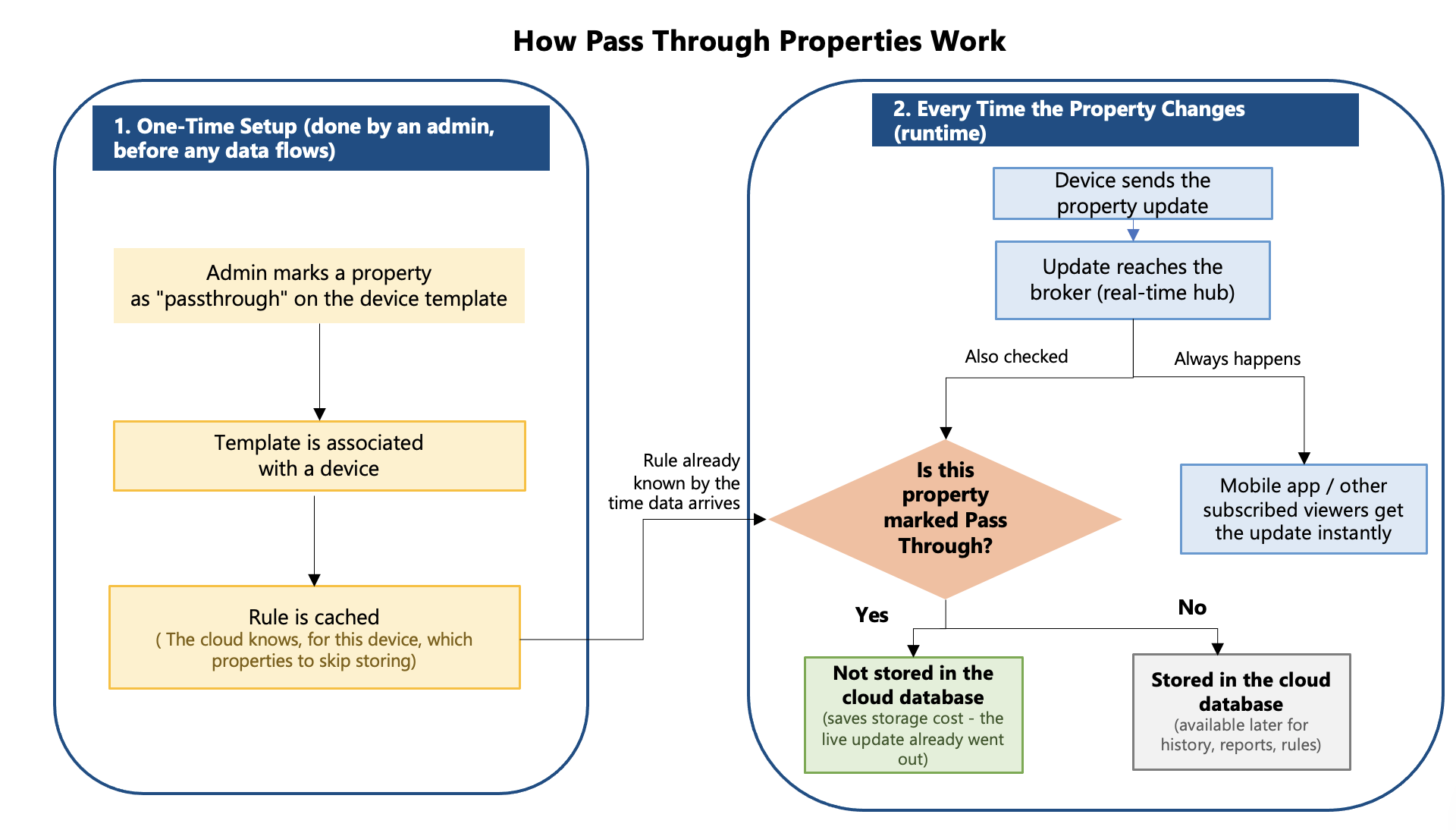
Pass-through Properties is a Native MQTT (Message Queuing Telemetry Transport) capability configured at the device template level. When a property is marked as pass-through, its datapoints are delivered directly through the MQTT broker to subscribed clients and are not stored in DPS (Datapoint Service), Ayla's backend for durable datapoint storage. This helps reduce storage overhead and provides lower-latency data streaming compared to regular properties that go through the DPS storage pipeline.
2. Concept and Design
Ordinary Native MQTT datapoints follow this path

Every hop after the broker exists to make sure the datapoint is durably stored and queryable later.
Pass-through properties are intended for high-frequency and real-time data where low latency is more important than long-term storage. These datapoints are delivered immediately to applications, such as mobile apps displaying live sensor readings or real-time device status updates, but are not stored because historical data is not required.
Storing every update for these types of data can increase storage usage and processing overhead. Pass-through properties use the same MQTT transport path as regular properties. After the datapoint reaches the cloud, the system checks the property's pass-through configuration:
- Pass-through property: The datapoint is delivered to subscribed clients through the MQTT broker but is not stored in the cloud database.
- Non pass-through property: The datapoint continues through the normal ingestion pipeline and is stored for future access.
This allows real-time data delivery while avoiding unnecessary storage operations for data that does not require persistence.
3. Template Configuration and Classification
3.1 Marking a Property as Pass-through
An admin marks specific properties as pass-through when creating the device template. This setting is applied to individual properties, so the same template can contain both pass-through and regular properties.
3.2 Validation Rules
The following combinations are rejected at template-save time:
| Rule | Restriction |
|---|---|
| Conflicting attributes | A property cannot have passthrough = true at the same time as any of: track_only_changes, host_sw_version, time_series, ack_enabled, smart_home_skill. |
| Base type restriction | passthrough = true is not allowed when the property's base_type is message or file. |
| Feed restriction | passthrough = true is not allowed when the property is a feed property. |
| Template classification restriction | A pass-through property cannot be added when the template is not classified as a Native MQTT template. (i.e., the template classification is "1" ,see section 3.3 and Section 9). |
3.3 Template Classification
The classification field identifies the type of device template being created. In the Ayla Developer Center, when an administrator creates or updates a template, they can select the Native MQTT classification to indicate that the template is intended for Native MQTT devices.
A key rule is that once the classification is set, it cannot be changed. This means a template created as a Native MQTT template will always remain a Native MQTT template, and a template created as a non-Native MQTT template can never be converted into a Native MQTT template later.
This restriction is important because pass-through properties are supported only for Native MQTT templates. The system validates this rule whenever a property is created or updated.
See Section 9, UI Changes for details on how to configure this in the dashboard.
4. Propagation Flow: Template → Device → Cache
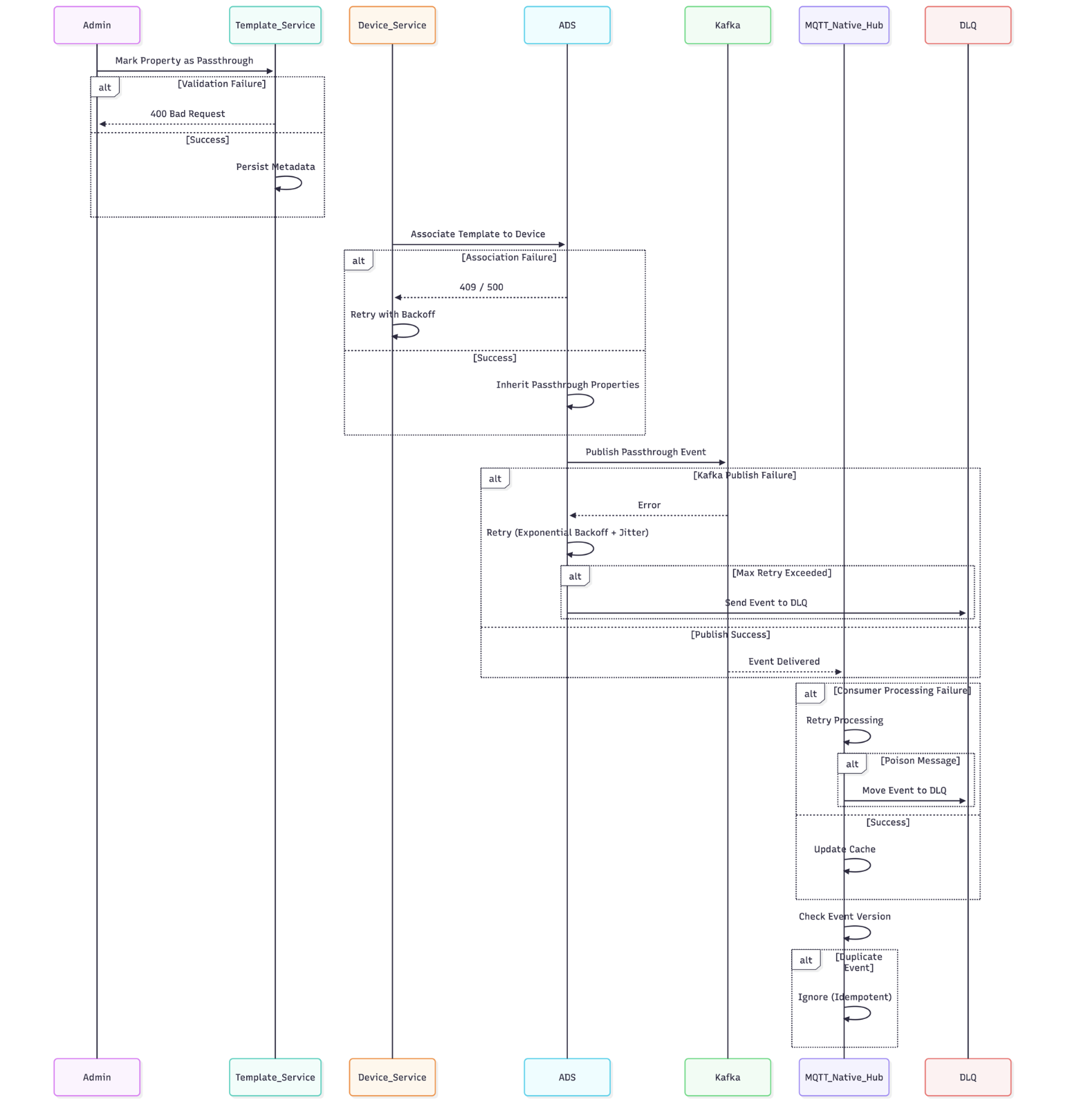
When a property is marked as pass-through in a device template, the change is asynchronously propagated to the Redis (cloud cache). Once the cache is updated, the ingestion pipeline uses the new setting to determine whether to store or skip incoming data for that property.
4.1 Flow Steps
| Step | Action |
|---|---|
| 1 -Template Configuration | An admin marks specific template properties as pass-through (see Section 3). |
| 2 - Template Association | When the template is associated with a device, ADS (Ayla Device Service) inherits the pass-through properties into that device's metadata. |
| 3 - Event Publication | ADS publishes the device-level pass-through properties to a Kafka topic. |
| 4 -Cache Update | mqtt-native-hub subscribes to that Kafka topic, consumes the event, and updates its internal cache. |
4.2 Sequence Diagram
4.3 Architectural Pattern

The pass-through configuration flow uses an event-driven architecture, where services communicate through events instead of making direct synchronous calls to each other.
This approach provides:
- Service decoupling: Template Service, ADS, and mqtt-native-hub operate independently and do not directly depend on each other for configuration updates.
- Eventual consistency: Changes made to a template are propagated asynchronously, so the cache may not update immediately but will become consistent after the event processing completes.
- Consistent cache updates: Kafka acts as the central event channel to propagate pass-through configuration changes and keep the cache synchronized across services.
4.4 Failure Handling
| Failure | Cause | Handling |
|---|---|---|
| Template Validation Failure | Invalid property type, duplicate property key, schema violation | Reject the request with 400; no downstream event is generated. |
| Template Association Failure | Device not found, concurrent association, ADS DB issue | Retry with exponential backoff; return 409 on conflict; alert on persistent failure. |
| Kafka Publish Failure | Broker unavailable, network timeout, partition error | Retry with backoff + jitter; route to DLQ after max retries; emit an alert metric. |
| Consumer Failure (mqtt-native-hub) | Cache corruption, invalid payload, deserialization error | Retry without committing the Kafka offset; route poison messages to DLQ; this prevents blocking the partition. |
| Duplicate Events | Kafka at-least-once delivery semantics, retry-based republish, consumer restart | Each event carries a version/timestamp; the cache is updated only if the incoming version is newer; older/duplicate events are ignored. |
4.5 Metrics to Monitor
Metrics to monitor are runtime measurements that track the performance, reliability, and health of the pass-through feature. They help identify issues such as delays, retries, processing failures, cache update delays, and duplicate messages.
| Metric | What it monitors | Why it matters |
|---|---|---|
passthrough_publish_latency | Time taken to forward a pass-through message after it is received | Ensures data is forwarded quickly. |
publish_retry_count | Number of times the system retries publishing a message | A high value may indicate network or broker issues. |
dlq_event_count | Number of messages sent to the Dead Letter Queue (DLQ) because they could not be processed | Indicates processing failures that need investigation. |
cache_update_latency | Time taken for template changes to reach the Redis (cloud cache) | Ensures new pass-through settings become effective promptly. |
duplicate_event_rate | Percentage or number of duplicate messages processed | Detects duplicate data caused by retries or communication issues. |
5. Template Association
When a template is associated with or dissociated from a Native MQTT device, ADS (Ayla Device Service) publishes a message to the ads-template-assoc-dissoc-topic Kafka topic, identified by the device's DSN (Device Serial Number):
{
  "template_id": "<template_id>",
  "dsn": "<dsn>",
  "op": "<event>"
}
op is either template_association or template_dissociation. This is the same event stream that drives the pass-through-property cache update described in Section 4.
6. Datapoint Ingestion Pipeline with Pass-through Filtering
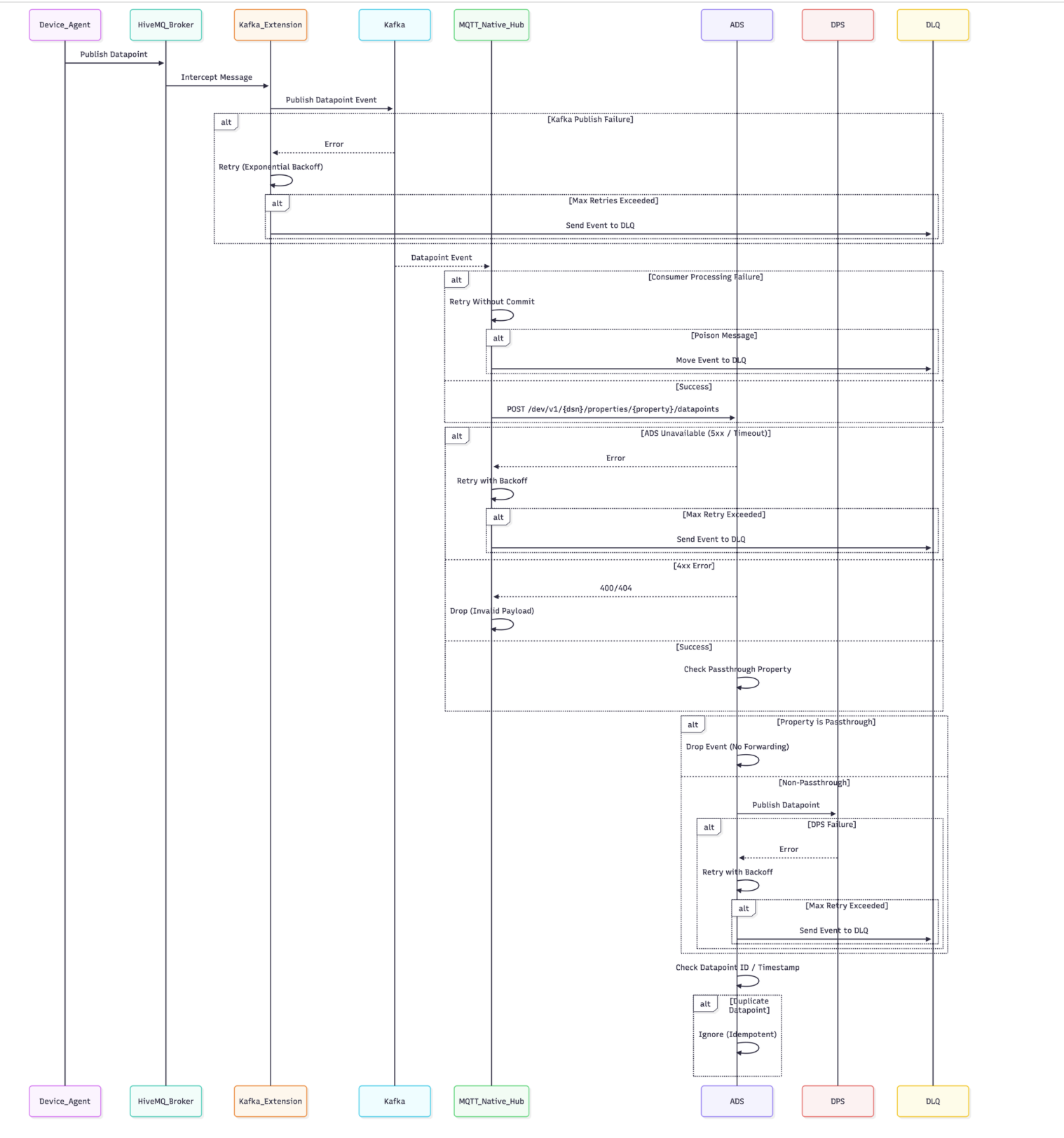
The following section details the runtime ingestion pipeline for datapoints received from connected devices. This flow is triggered during normal device operation and is distinct from the asynchronous template-to-device-to-cache propagation process described in Section 4.
6.1 Flow
6.2 Pass-through Check Logic
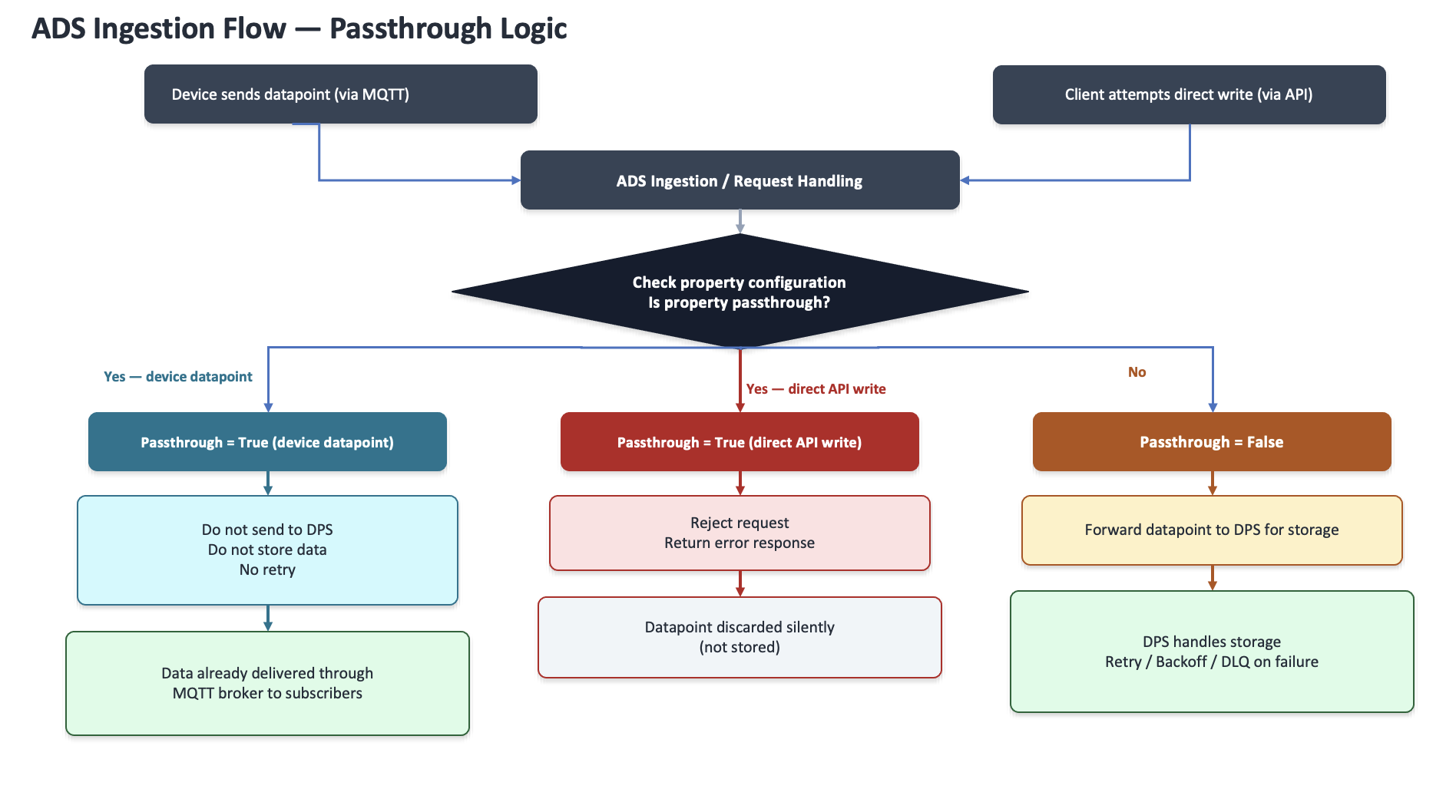
After a datapoint reaches ADS through the ingestion pipeline, ADS checks whether the associated property is configured as pass-through.
-
If the property is pass-through: ADS does not forward the datapoint to DPS (Datapoint Service) for storage. The datapoint has already been delivered through the MQTT broker to any subscribed clients, so no further processing is required. ADS simply ignores the datapoint and does not store it. No retry is performed.
-
If a direct write is attempted for a pass-through property: ADS rejects the write with a
4xxerror response indicating the property does not accept direct writes; the datapoint is not delivered and not stored. This gives integrators a clear, actionable signal that distinguishes normal pass-through behavior (data delivered via MQTT but not stored) from an invalid write attempt (rejected outright). -
If the property is not pass-through: ADS forwards the datapoint to DPS for permanent storage. DPS manages any storage failures using retry, backoff, and dead-letter queue (DLQ) mechanisms.
6.3 Failure Handling
| Failure | Cause | Handling |
|---|---|---|
| Kafka Publish Failure (Broker → Kafka) | Kafka broker down, network timeout, partition unavailable | Retry with exponential backoff + jitter; move to DLQ after threshold; emit an alert metric. |
Kafka Consumer Failure (mqtt-native-hub) | JSON parse failure, cache corruption, dependency failure | Do not commit the Kafka offset; retry processing; route poison messages to DLQ. |
| ADS REST Failure | See table below | — |
| DPS Publish Failure | Downstream analytics outage, message broker failure | Retry with backoff; DLQ after max retries. |
| Duplicate Datapoints | Kafka at-least-once semantics, retries, device resend | Datapoint ID or timestamp is checked before insert; duplicates are ignored. |
ADS REST failure behavior:
| Error type | Behavior |
|---|---|
| 5xx | Retry |
| Timeout | Retry |
| 4xx | Drop (invalid request) |
6.4 Metrics to Monitor
These metrics help monitor the health and performance of the datapoint ingestion pipeline.
| Metric | Meaning | Example / Purpose |
|---|---|---|
datapoint_ingest_rate | Number of datapoints received and processed by ADS over a period of time | Helps monitor device data volume and detect sudden drops or spikes in incoming data |
kafka_retry_count | Number of times ADS retries publishing datapoints to Kafka when the initial publish fails | Helps identify Kafka connectivity or availability issues |
rest_retry_count | Number of times ADS retries REST API calls when communication with downstream services fails | Helps identify failures in service-to-service communication |
dps_publish_latency | Time taken for ADS to send a datapoint to DPS and receive confirmation | Helps monitor DPS (Datapoint Service) performance and detect slow processing |
dlq_rate | Number of datapoints moved to the Dead Letter Queue (DLQ) after all retry attempts fail | Helps identify datapoints that could not be processed or stored successfully |
duplicate_datapoint_rate | Number or percentage of duplicate datapoints detected during ingestion | Helps identify issues where the same datapoint is received or processed multiple times |
7. The mqtt-native-hub Service
The mqtt-native-hub service acts as a filter. It reads datapoints from Kafka, checks the pass-through configuration stored in Redis (cloud cache), and decides whether each datapoint should be discarded or forwarded to DPS (Datapoint Service) for storage. It is called the enforcement point because this is where the pass-through rule is actually applied. For more details refer to Section 6.
8. Infrastructure Components
| Component | Purpose |
|---|---|
| mnh-data-lane0 | Receives incoming datapoints from Native MQTT devices through HiveMQ and processes them. It routes datapoints based on the property's pass-through configuration. |
| Redis (cloud cache) | Stores the cached pass-through configuration for devices and properties. mqtt-native-hub queries Redis (cloud cache) during runtime to determine whether a datapoint should be forwarded for storage or ignored. |
| Kafka | Buffers incoming device datapoints before they are processed by mqtt-native-hub. This enables scalable and asynchronous datapoint processing. |
| ads-api-v2 | Provides an internal API that allows services such as mqtt-native-hub to retrieve the pass-through configuration for a device (DSN). This API is intended for inter-service communication only. |
9. UI Changes
This section explains creating a device template in the Ayla Developer Center and adding one or more pass-through properties to it.
Pass-through properties are only available on templates classified as Native MQTT. This is set on the template's Details tab and cannot be changed after the fact for existing properties.
-
Login to Ayla Developer Center.
-
From the top navigation bar, go to Templates.
-
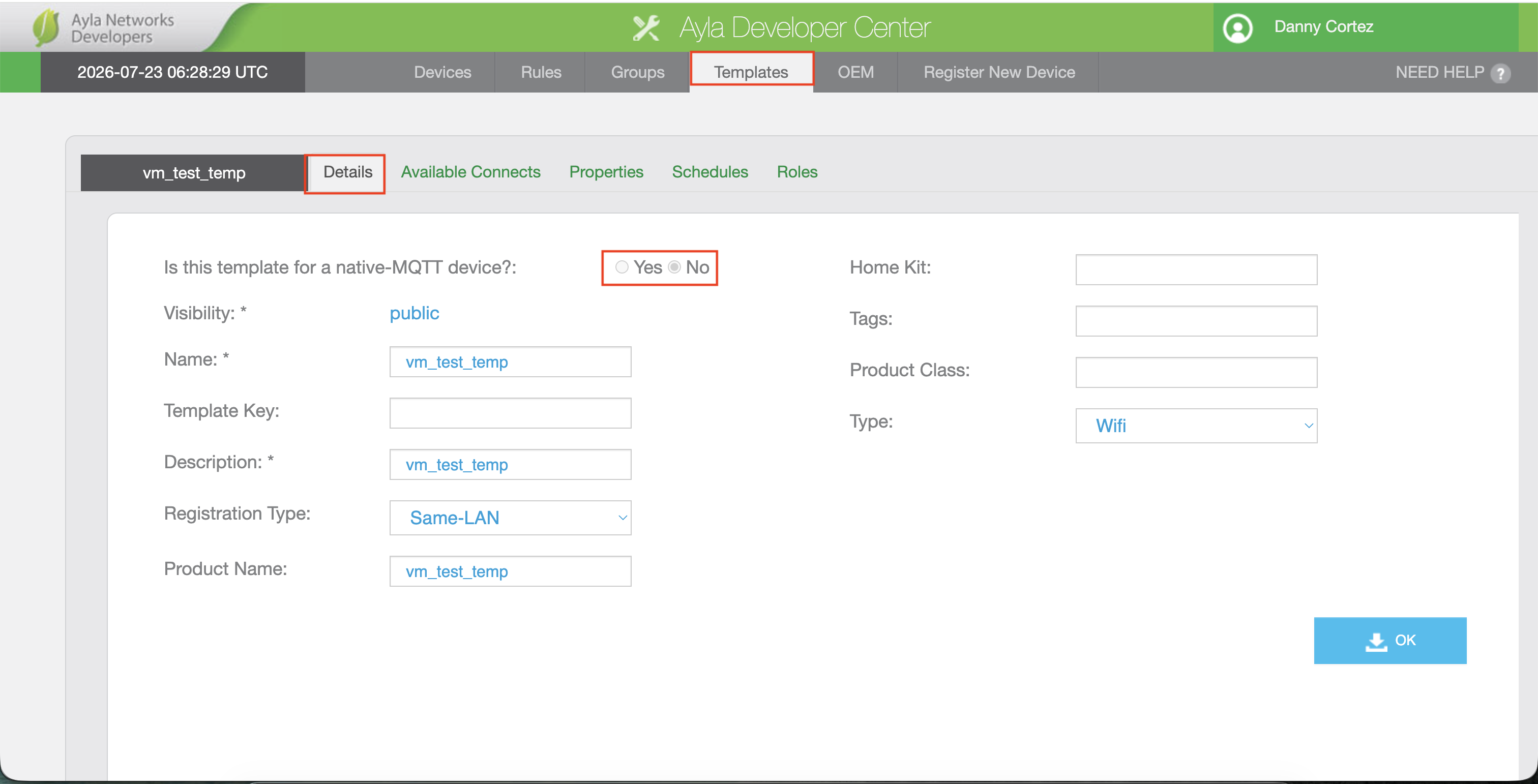
Open an existing template, or create a new one, and go to its Details tab.
-
Locate Is this template for a native-MQTT device? and select:
-
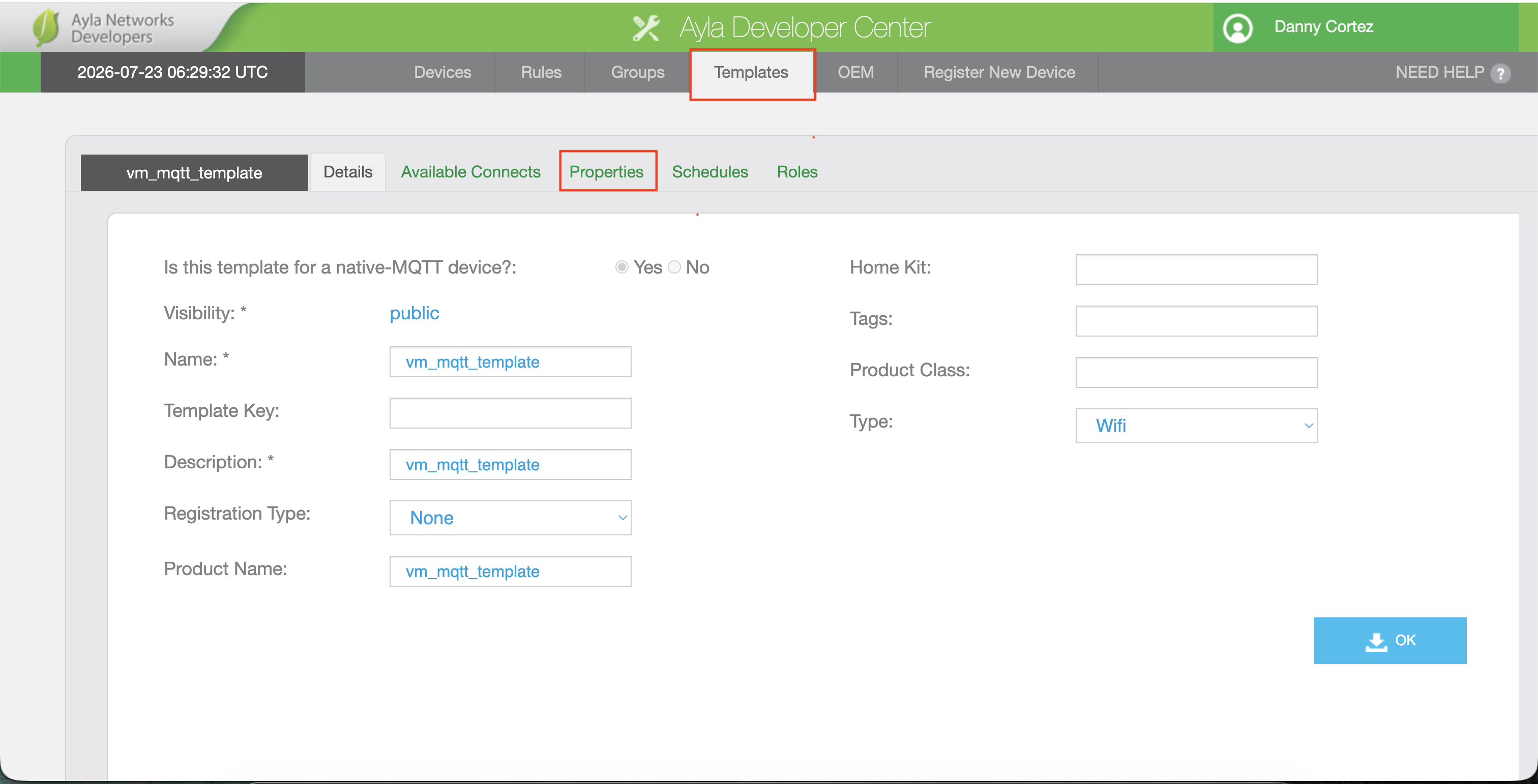
Yes -if the device connects using native MQTT. This unlocks pass-through support for the template's properties.
-
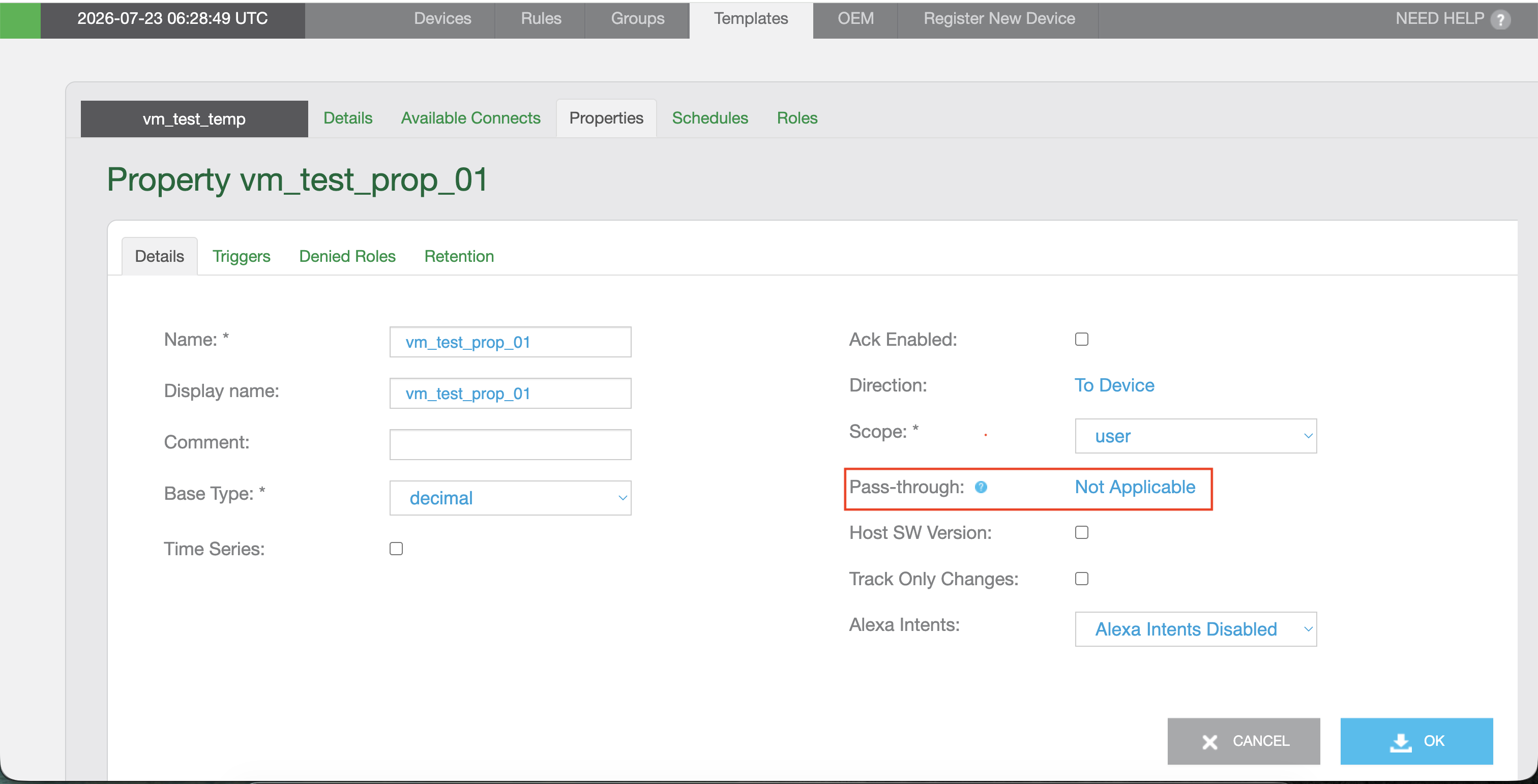
No - if the device does not use native MQTT. Pass-through will be unavailable for every property on this template.
-
-
To create properties with pass-through, navigate to Templates page, and select the Properties tab.
-
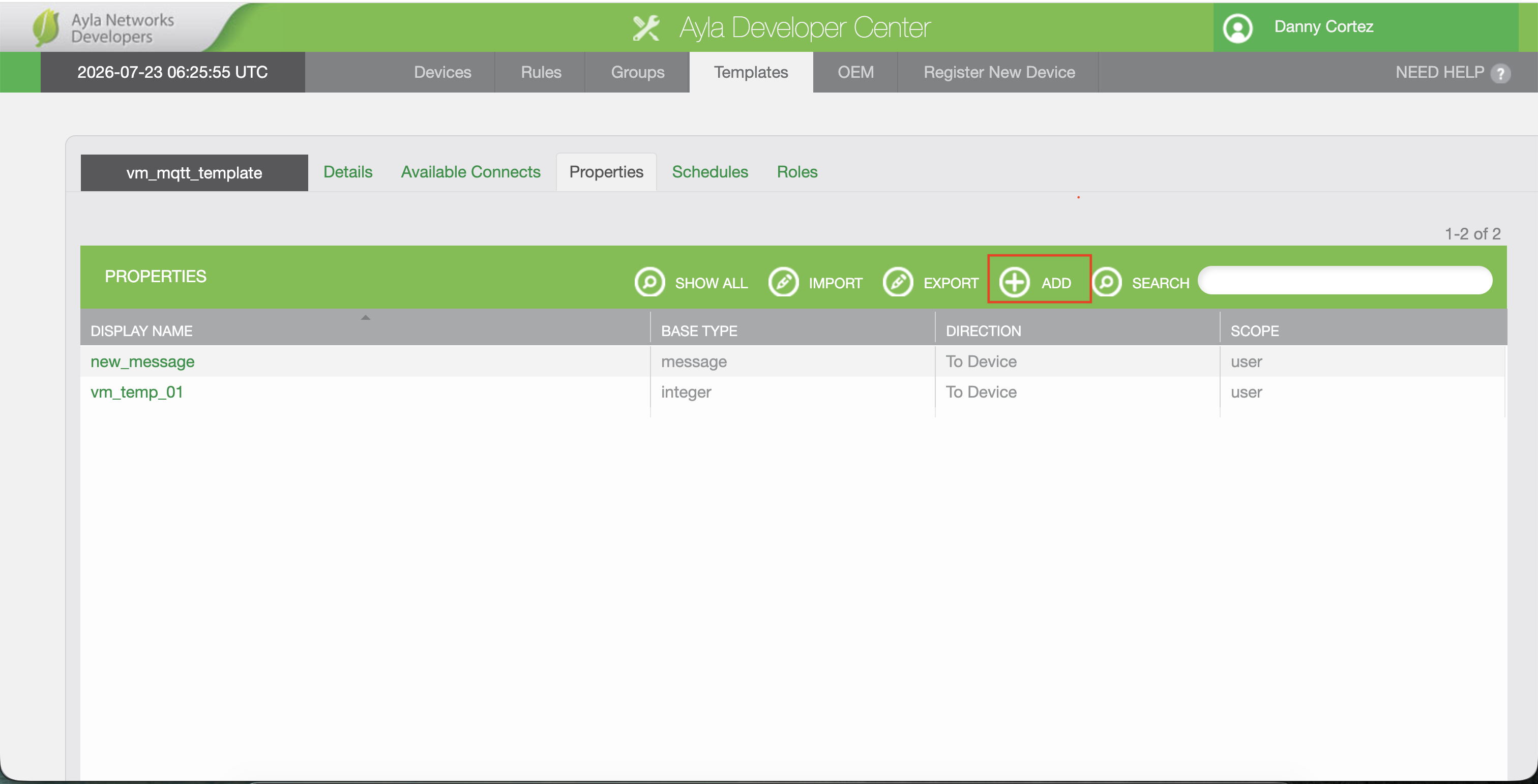
Click ADD to open the New Property dialog.
-
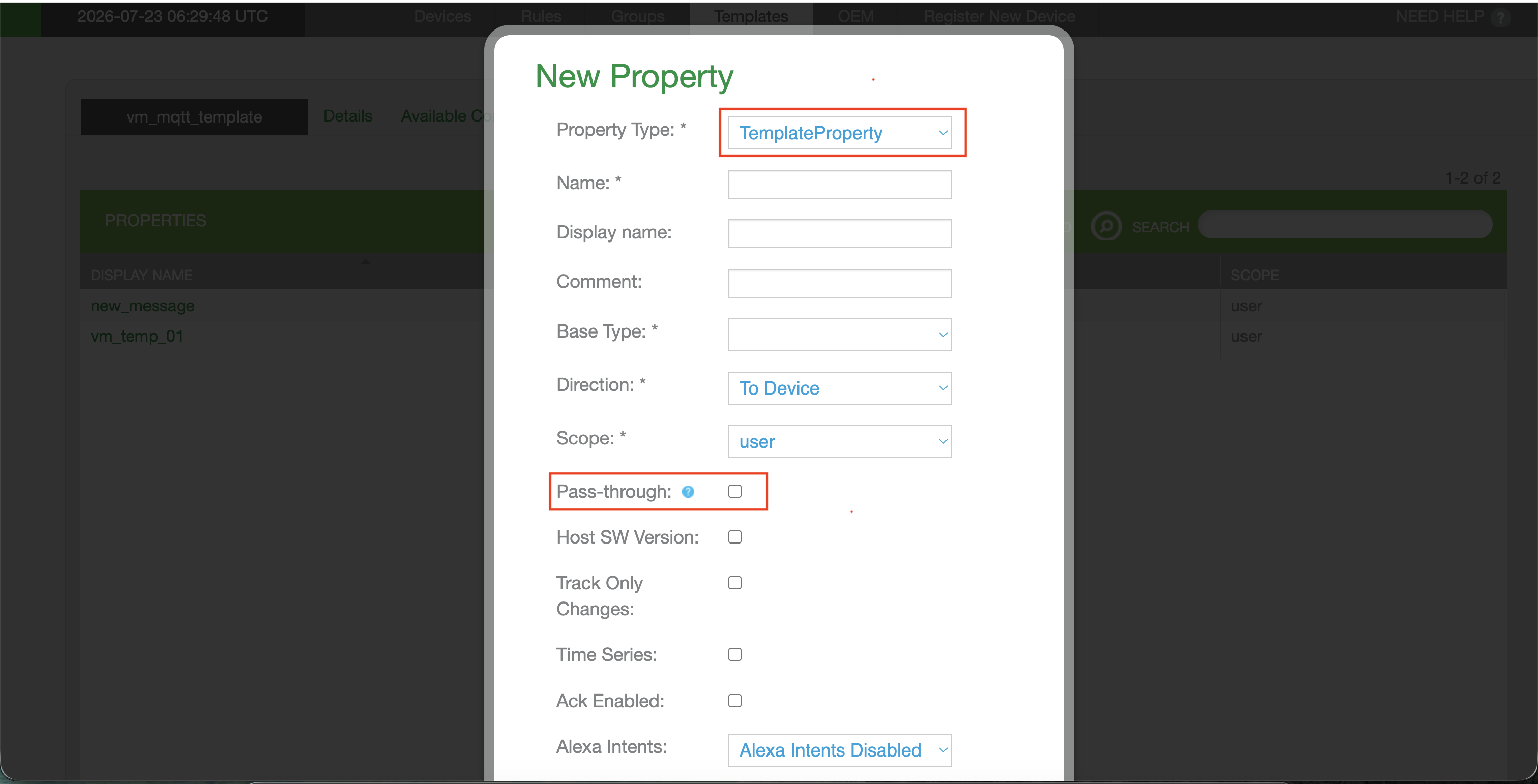
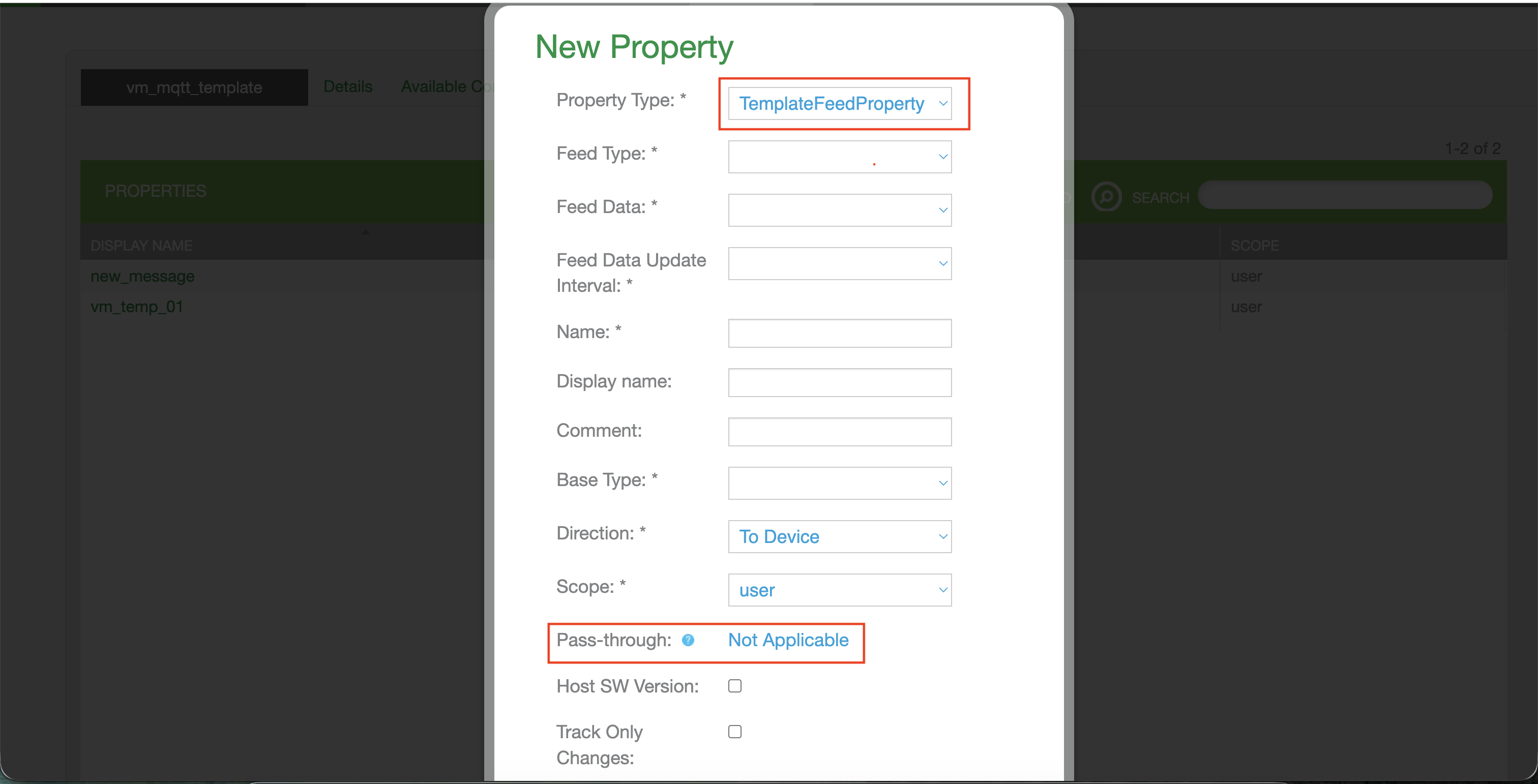
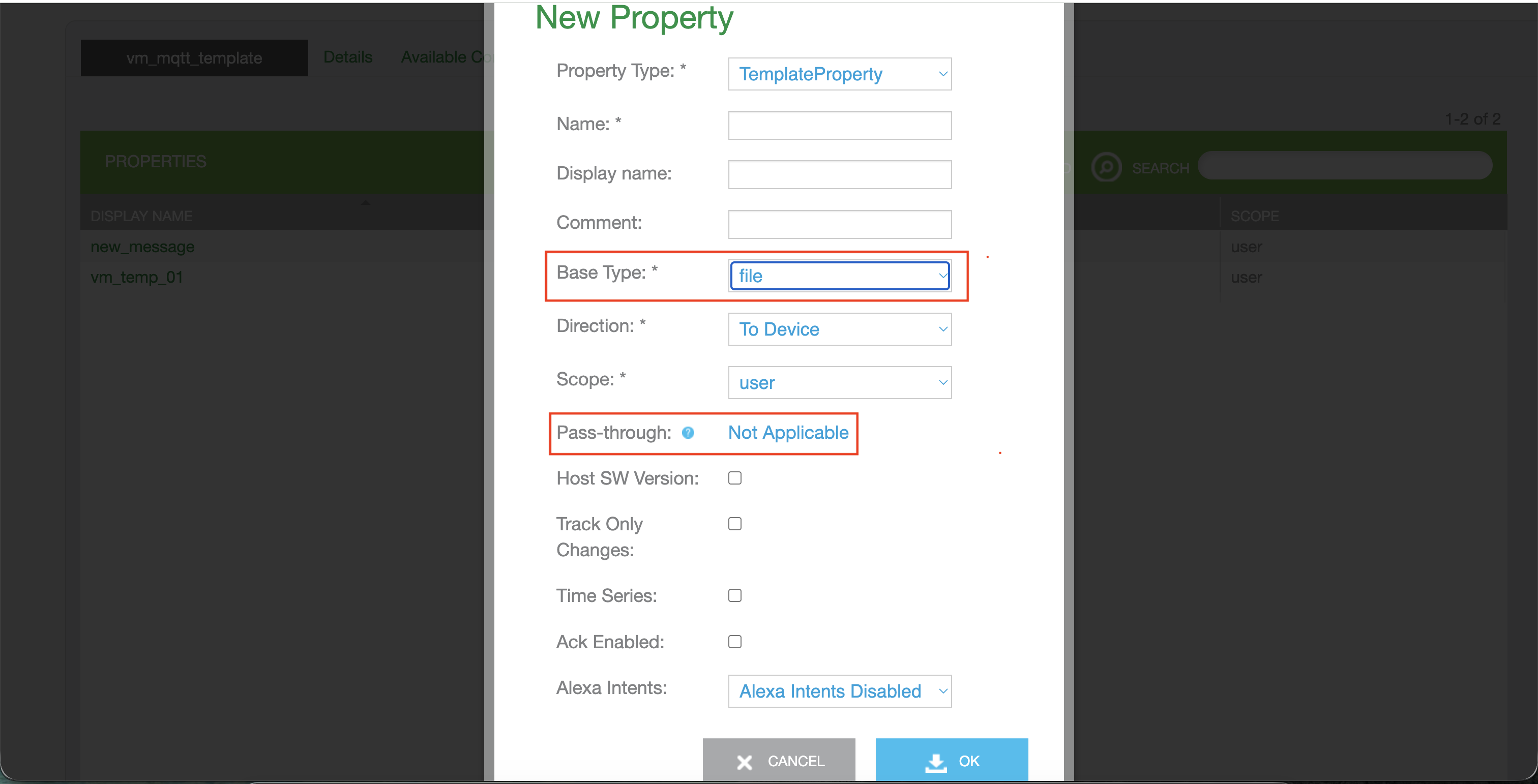
In the New Property dialog, the first field is Property Type.
-
TemplateProperty - a standard property. Pass-through is selectable here.
-
TemplateFeedProperty - a feed property. Pass-through is Not Applicable for feed properties.
-
-
Enter a Name. Optionally enter a Display name and Comment.
-
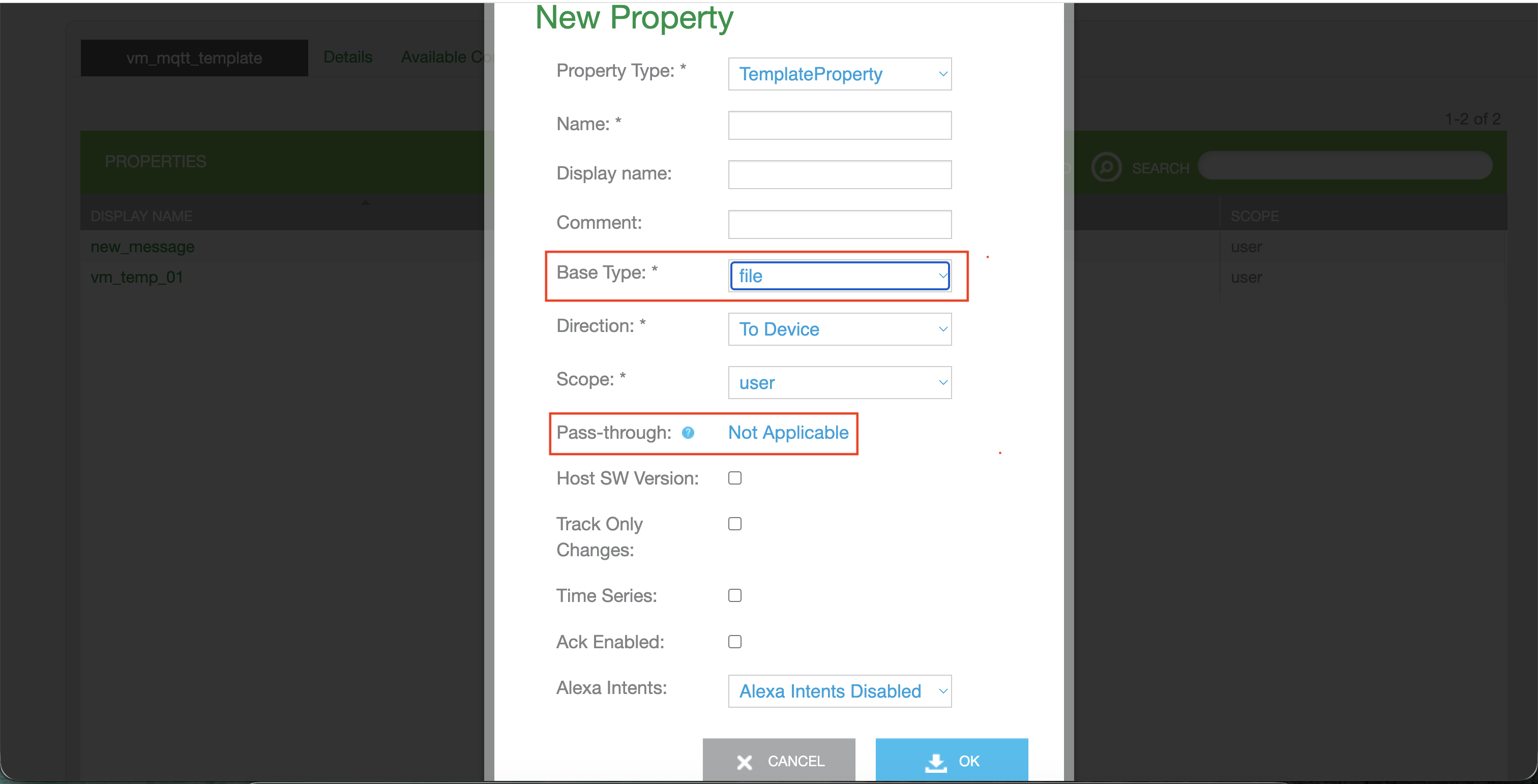
Select the Base Type.
-
If the Base Type is set to File or Message, the Pass-through option is Not Applicable.
-
-
Set Direction and Scope from the drop-down list.
-
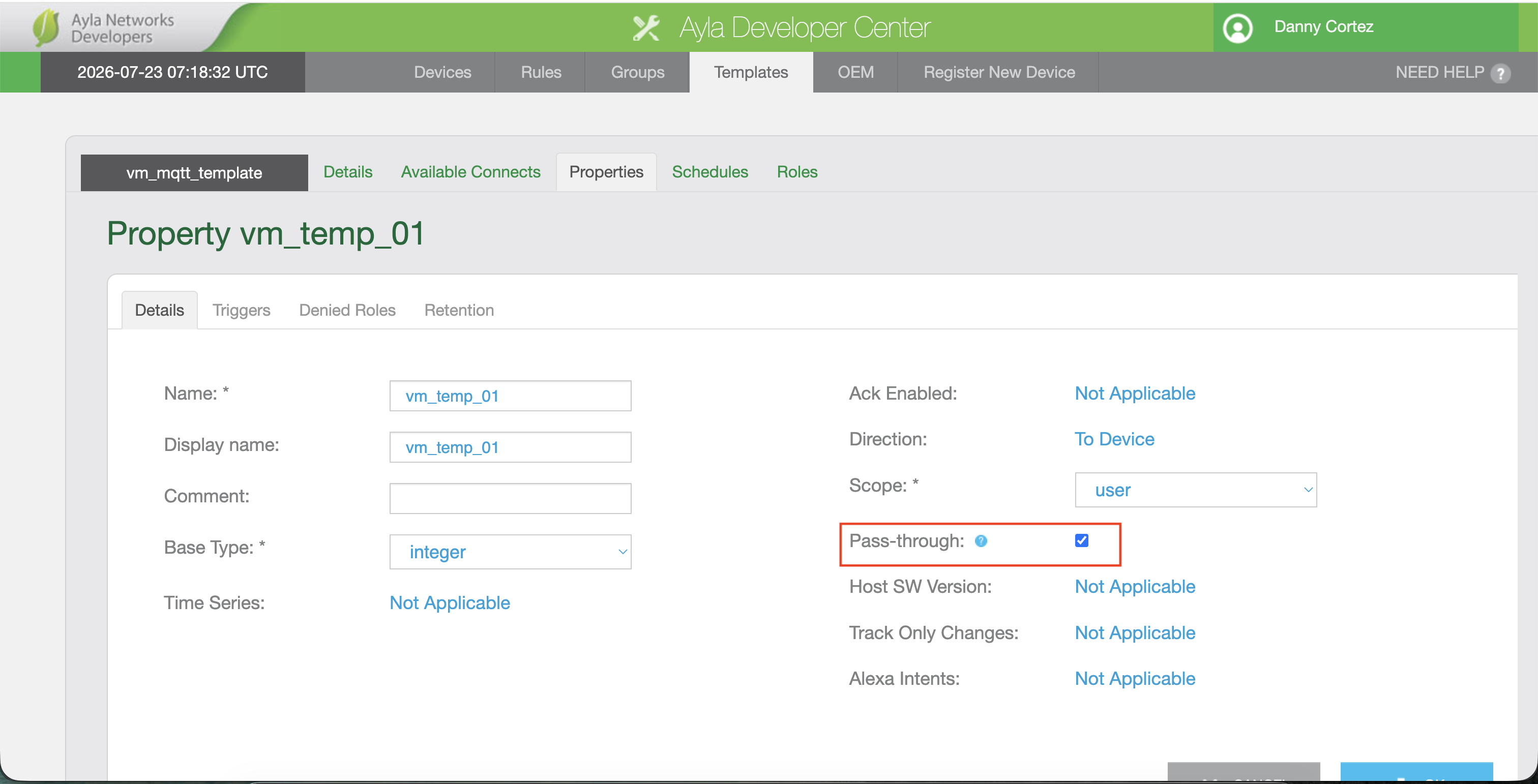
Select Pass-through checkbox.
-
Once Pass-through is enabled, the system automatically sets the following attributes to Not Applicable and makes them non-editable:
-
Host SW Version
-
Track Only Changes
-
Time Series
-
Ack Enabled
-
Alexa Intents
-
-
Review all fields and Click OK to save the property to the template.
Ayla Customer Dashboard Changes
-
Login to Ayla Customer Dashboard.
-
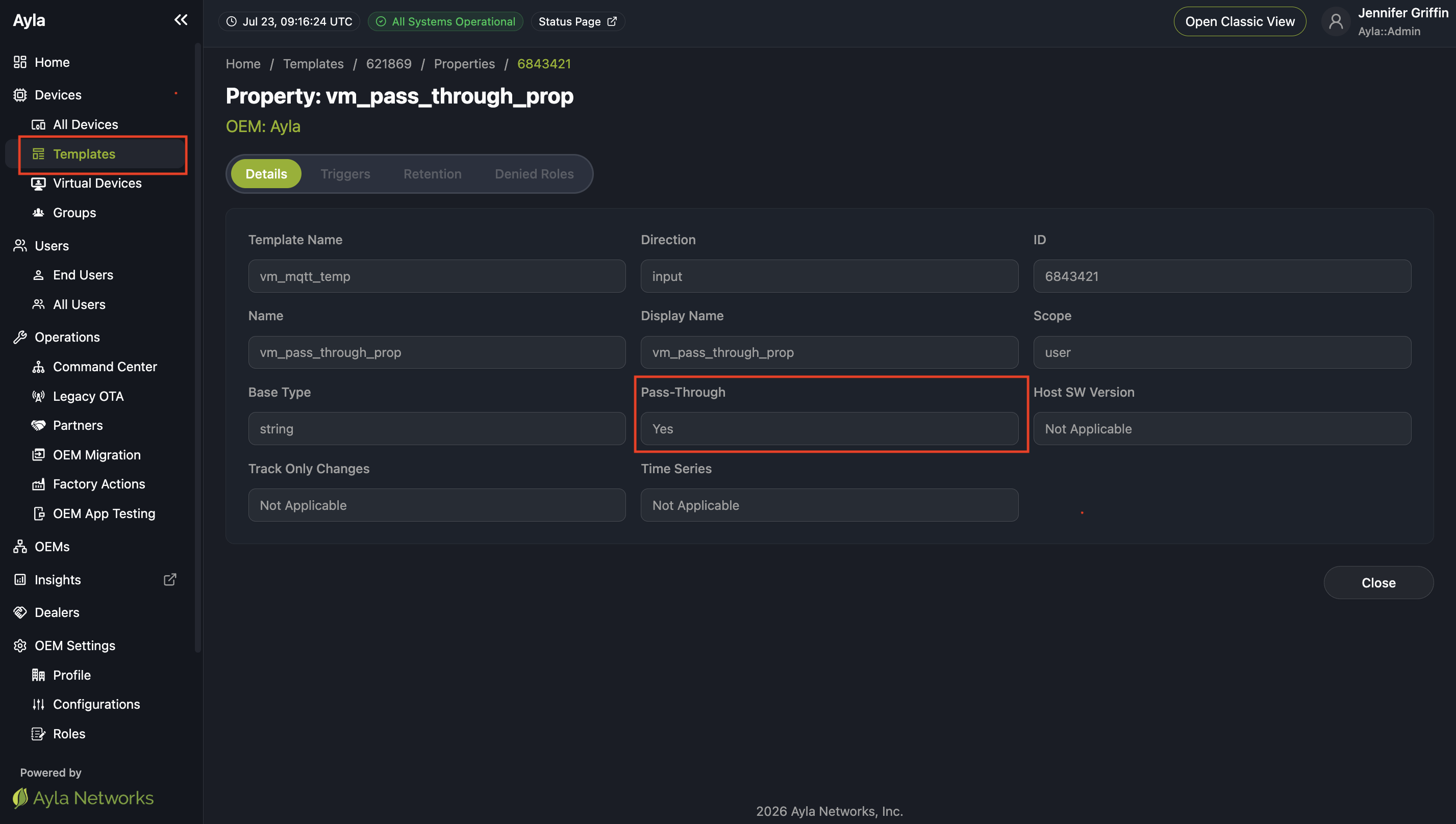
Navigate to Templates Page.
-
On the Properties details page, you can view the Pass-Through value.
10. Glossary
| Term | Meaning |
|---|---|
| ADS | Ayla Device Service - the core cloud service managing device records, properties, and commands. |
| DPS | Datapoint Service - the backend service responsible for durable storage of device datapoints. |
| DLQ | Dead Letter Queue -holds messages that failed processing after max retries. |
| DSN | Device Serial Number - Ayla's unique device identifier. |
| mqtt-native-hub | The Spring Boot service that consumes device datapoints from Kafka, applies pass-through filtering, and forwards qualifying datapoints to DPS (Datapoint Service). |
| Non pass-through property | A property whose datapoints are durably stored via DPS (Datapoint Service) in the normal way. |
| Pass-through property | A template property flagged so its datapoints are delivered broker-to-peer only and never persisted to cloud storage. |
| Template classification | An immutable flag, set in the Ayla Developer Center, indicating whether a template is a Native MQTT template; gates whether pass-through properties can be added. |
| MQTT | Message Queuing Telemetry Transport - the lightweight publish/subscribe messaging protocol devices use to communicate with the cloud. |
| Native MQTT | A device connectivity model in which devices communicate directly over MQTT, as distinct from Ayla's standard agent/library-based connectivity. |
| HiveMQ | The MQTT broker used as the device-facing message broker in the Native MQTT pipeline. |
| Kafka | The distributed event-streaming platform used for internal, asynchronous service-to-service messaging (e.g., propagating template/pass-through configuration changes). |
| Redis (cloud cache) | The in-memory data store used by mqtt-native-hub to cache pass-through configuration for fast runtime lookups. |
| Template Service | The service responsible for validating and persisting device template definitions, including pass-through property configuration, before that configuration is propagated downstream . |
| Kafka Extension | The component in the ingestion path that forwards datapoints from Kafka toward ADS. |
Updated about 2 months ago